
7 Types of Wireless Access Points and Their Configurations
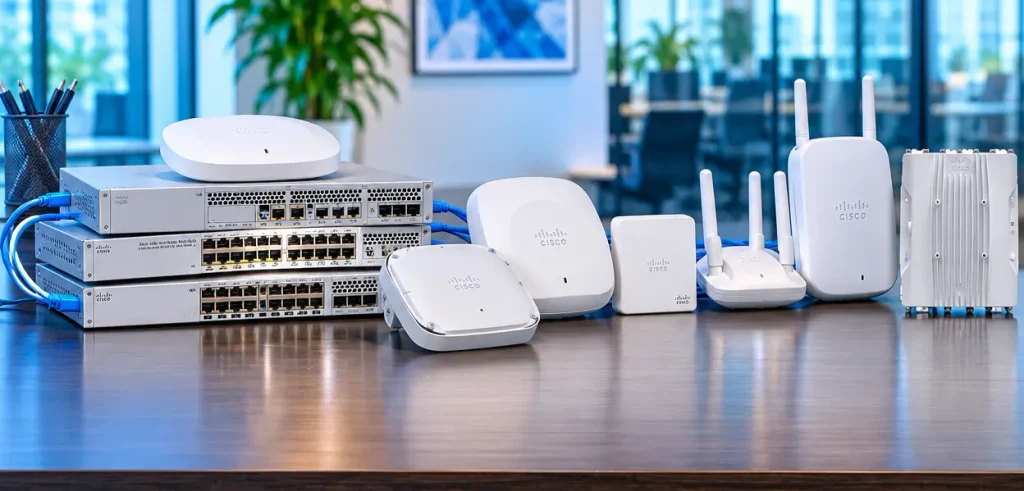
Wireless access points play an important role in connecting devices to business networks. However, not all access points are designed for the same purpose. Some suit small offices, while others are built for large enterprise networks, outdoor environments or industrial locations across Dubai and the UAE.
Choosing the right access point means understanding its management method, installation environment, coverage capabilities and network configuration.
In this guide, FSI Information Technology, an authorised Cisco supplier in Dubai, explores seven common types of wireless access points, their configurations, where they are used and which Cisco product to choose for each one.
What Are Wireless Access Points?
A wireless access point (WAP) is a networking device that allows WiFi enabled devices to connect to a wired local area network (LAN). It usually connects to an Ethernet switch through a network cable and broadcasts a wireless signal for nearby devices.
Businesses use wireless access points to provide network access across offices, meeting rooms, warehouses, campuses and other work environments.
If you need a basic explanation of how access points connect to a network and how they differ from routers and Ethernet switches, read our guide: What Is a Network Access Point? Wired vs Wireless Explained.
7 Types of Wireless Access Points
1. Standalone Access Points
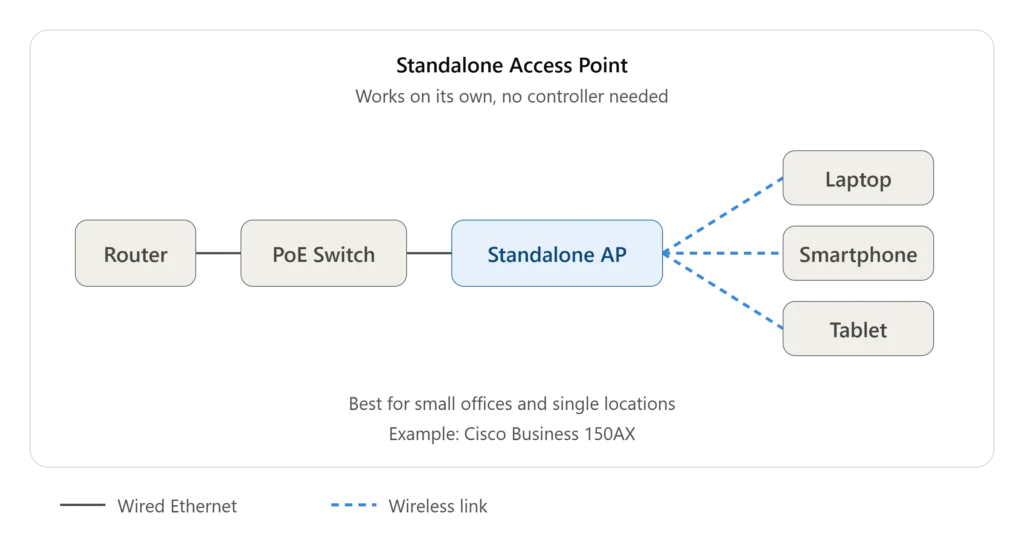
Standalone access points operate independently and are configured individually. They suit smaller networks where only a limited number of access points are needed. Network administrators can configure each device separately without a central wireless controller.
Main features:
- Individual configuration and management
- Suitable for smaller wireless networks
- Simple deployment
- Limited centralised management compared with controller based systems
Common applications: Small offices, home offices and single location businesses.
2. Controller Based Access Points
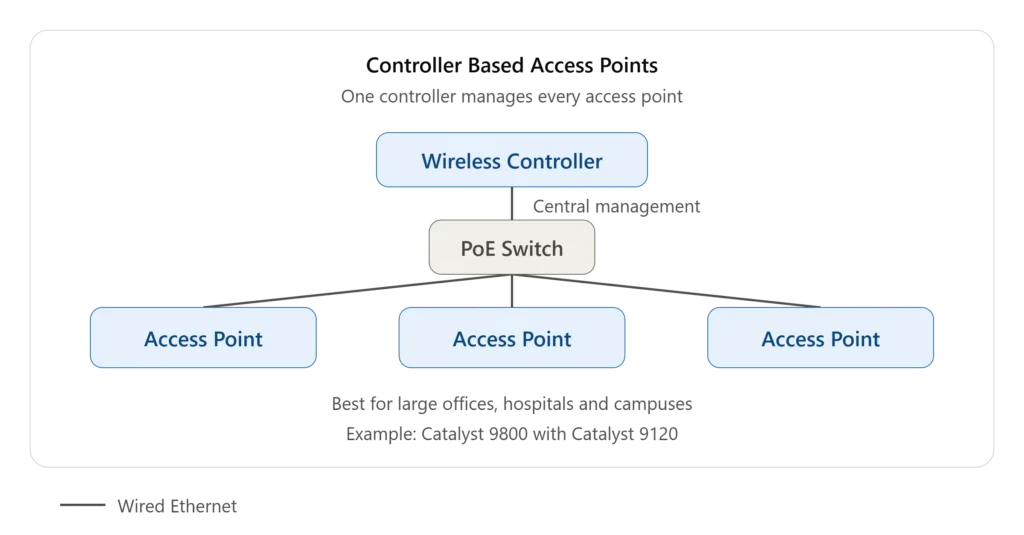
Controller based access points are managed through a central wireless LAN controller (WLC). The controller gives administrators one place to configure wireless settings, apply security policies, monitor performance and troubleshoot connected devices.
This approach is especially useful when a business operates across multiple floors or large buildings. For example, the Cisco Catalyst 9800 wireless controller is designed for centralised management of enterprise wireless networks, working with access points such as the Cisco Catalyst 9120 and Aironet 2800.
Main features:
- Centralised configuration
- Consistent wireless policies
- Easier monitoring of multiple access points
- Centralised management and troubleshooting
Common applications: Enterprise offices, hospitals, universities and large commercial buildings.
3. Cloud Managed Access Points
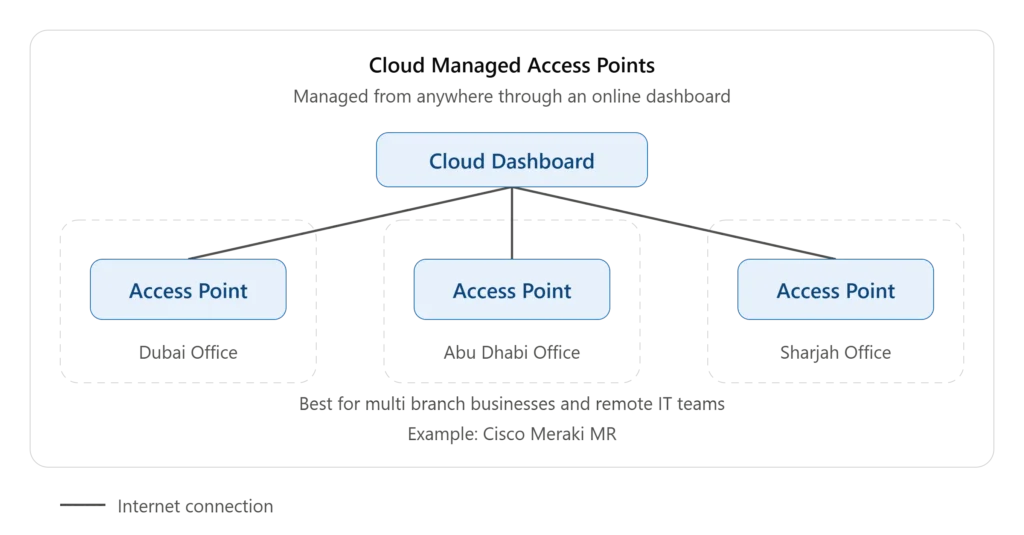
Cloud managed access points are controlled through an online management platform. Instead of relying entirely on an on premises controller, administrators can manage compatible access points through a cloud dashboard.
Depending on the platform, features may include remote configuration, network monitoring, performance reports, device visibility and alerts. Cisco Meraki MR is a well known example of cloud managed WiFi for businesses.
- Remote network management
- Centralised visibility across multiple locations
- Cloud based configuration
- Convenient management for distributed networks
Common applications: Retail chains, multi branch businesses and organisations with remote IT teams.
4. Indoor Access Points
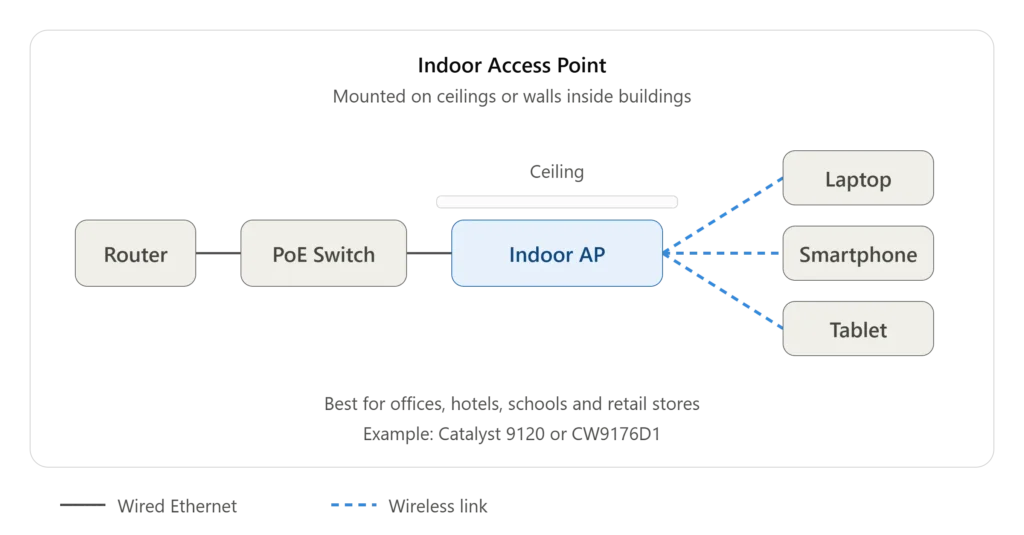
Indoor access points are designed for use inside buildings. They are commonly mounted on ceilings or walls to distribute wireless coverage throughout an office or commercial space. Their design and antenna characteristics vary depending on the environment and coverage requirements.
Popular Cisco options include the Cisco Catalyst 9120, a WiFi 6 access point, and the Cisco Aironet 2800 indoor access point.
Main features:
- Designed for indoor installation
- Suitable for offices and shared spaces
- Available in different antenna and performance configurations
- Supports wireless connectivity for employees and visitors
Common applications: Offices, hotels, schools, hospitals and retail stores.
5. Outdoor Access Points
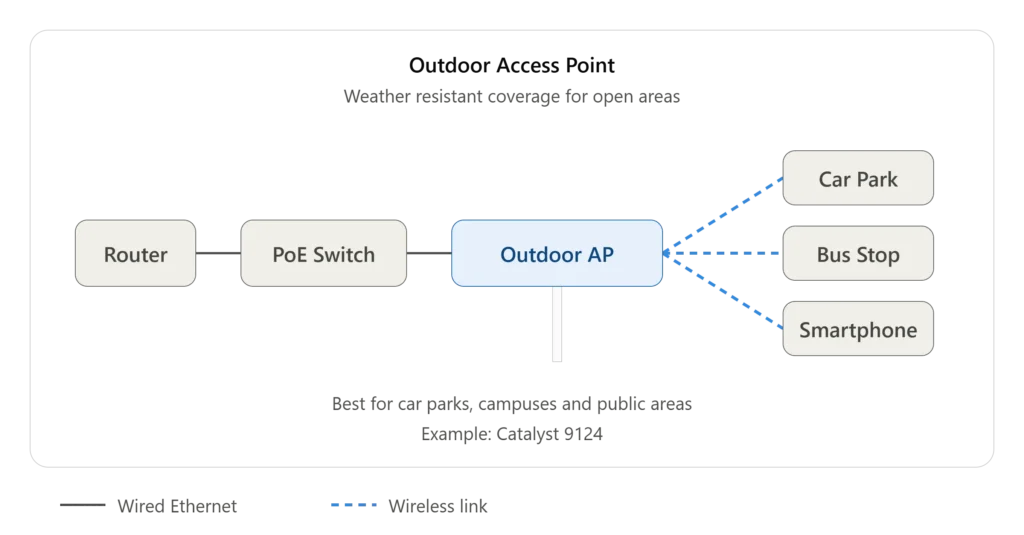
Outdoor access points are designed to operate in external environments. They typically have weather resistant enclosures and environmental protection features, and they can provide coverage in areas where indoor access points would not be suitable.
This matters in the UAE, where outdoor equipment has to cope with high heat and dust, so always check the operating specifications of the model you choose.
Main features:
- Designed for outdoor deployment
- Weather resistant construction, depending on the model
- Suitable for larger external coverage areas
- May support specialised mounting and antenna options
Common applications: Parking areas, university campuses, outdoor venues, warehouses and industrial yards.
6. Ruggedised Access Points
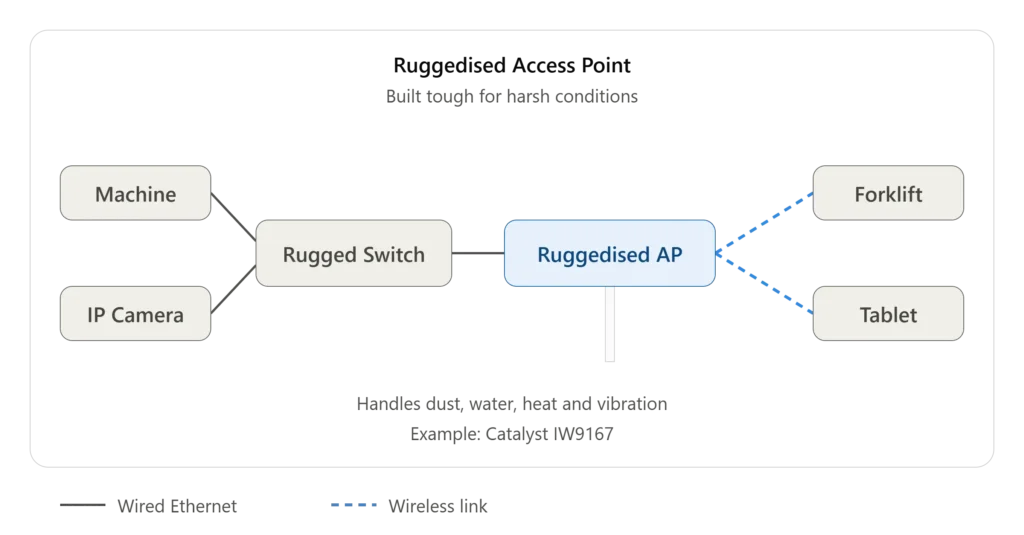
Ruggedised access points are designed for demanding environments where standard indoor devices may not be suitable. Depending on the product, they may offer enhanced protection against dust, moisture, vibration and temperature changes.
They are often paired with rugged switches, such as the Cisco Catalyst Rugged Switch IE-3100-8P2C-E, to build a network that suits industrial sites.
Main features:
- Designed for challenging operating conditions
- May provide enhanced environmental protection
- Suitable for industrial and demanding locations
- Available with different wireless capabilities and mounting options
Common applications: Manufacturing facilities, industrial sites, warehouses and other demanding environments.
7. Mesh Access Points
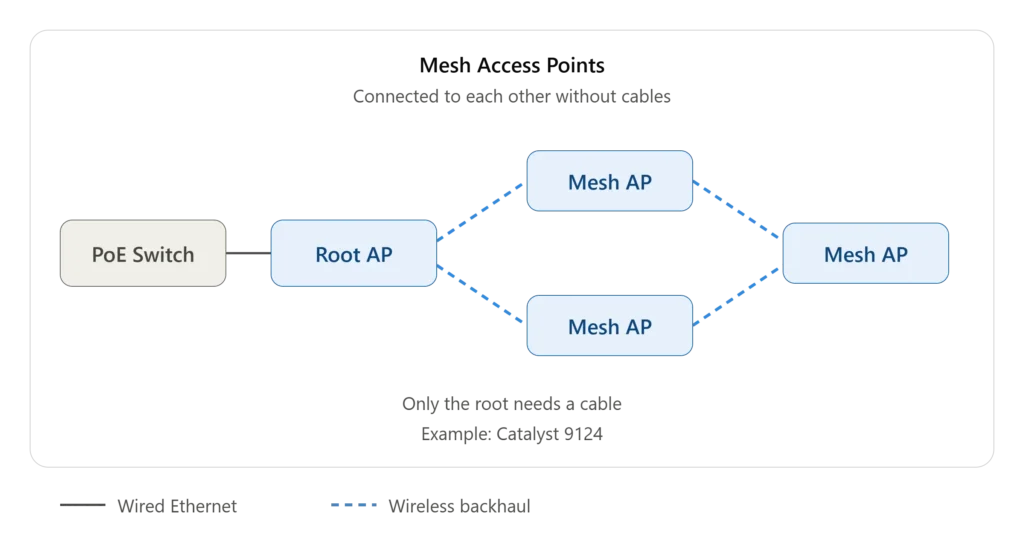
Mesh access points work together to extend wireless coverage across a larger area. In a mesh network, multiple nodes communicate with each other to provide connectivity across different locations. Some nodes use wireless backhaul, while others may use Ethernet connections.
Mesh technology can be useful where running cables to every access point is difficult. However, performance depends on node placement, signal quality, interference and backhaul capacity.
Main features:
- Extends wireless coverage
- Supports communication between multiple nodes
- Can use wireless or wired backhaul
- Offers flexible deployment options
Common applications: Large buildings, hard to wire locations, temporary installations and extended coverage areas.
Quick Guide: Which Cisco Product Should You Choose?
| Access Point Type | Best For | Recommended Cisco Product |
|---|---|---|
| Standalone | Small offices, single location | Cisco Business 150AX |
| Controller based | Large offices, hospitals, campuses | Cisco Catalyst 9120 with Catalyst 9800 controller |
| Cloud managed | Multi branch businesses | Cisco Meraki MR |
| Indoor | Offices, hotels, schools | Cisco Catalyst 9120 or Cisco CW9176D1 |
| Outdoor | Car parks, campuses, outdoor venues | Cisco Catalyst 9124 |
| Ruggedised | Factories, ports, industrial sites | Cisco Catalyst IW9167 |
| Mesh | Hard to wire areas | Cisco Catalyst 9124 (outdoor) or Cisco Business 150AX with 151AXM (small sites) |
| PoE power | Powering all of the above | Cisco Catalyst 9200L, 9300 or 9300X switches |
Common Wireless Access Point Configurations
Apart from their physical design and management methods, access points can operate in different configurations depending on the network architecture.
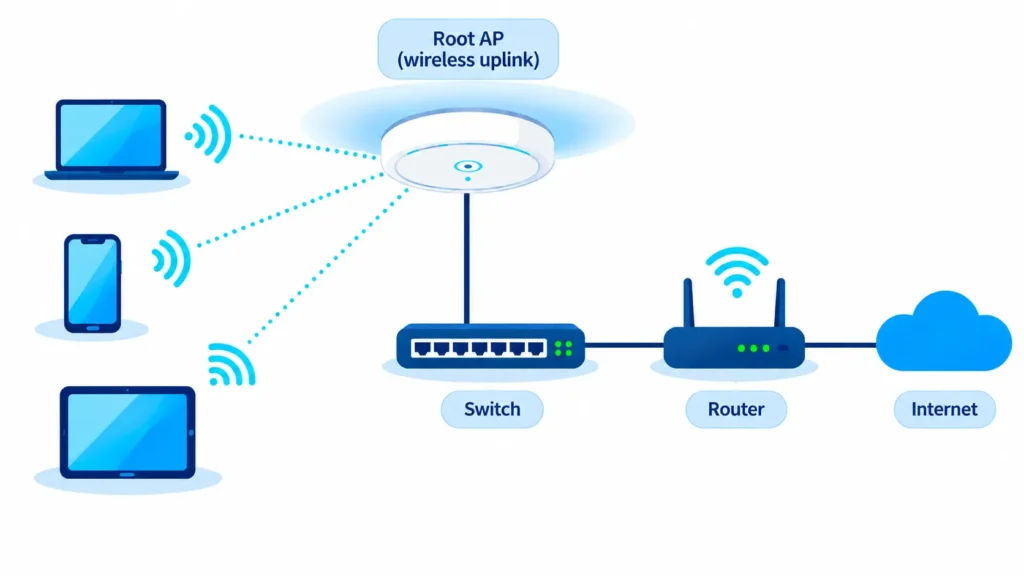
Root Access Point
A root access point connects to the wired network and provides wireless connectivity to client devices. It can also act as the main connection point for supported wireless infrastructure links.
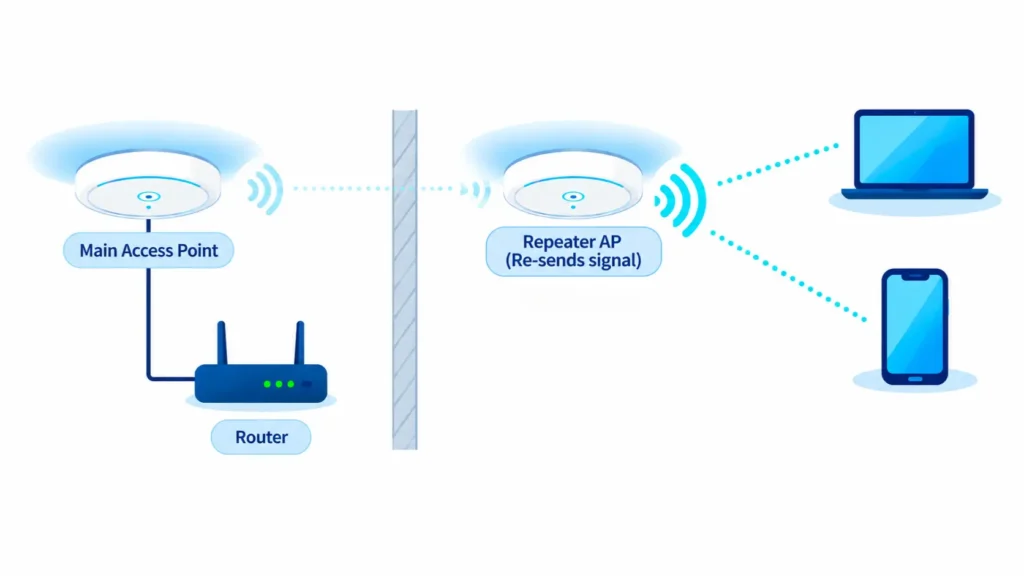
Repeater Access Point
A repeater receives an existing wireless signal and retransmits it to extend coverage into areas with weak reception. Its performance depends on the quality of the original signal and the available wireless capacity.
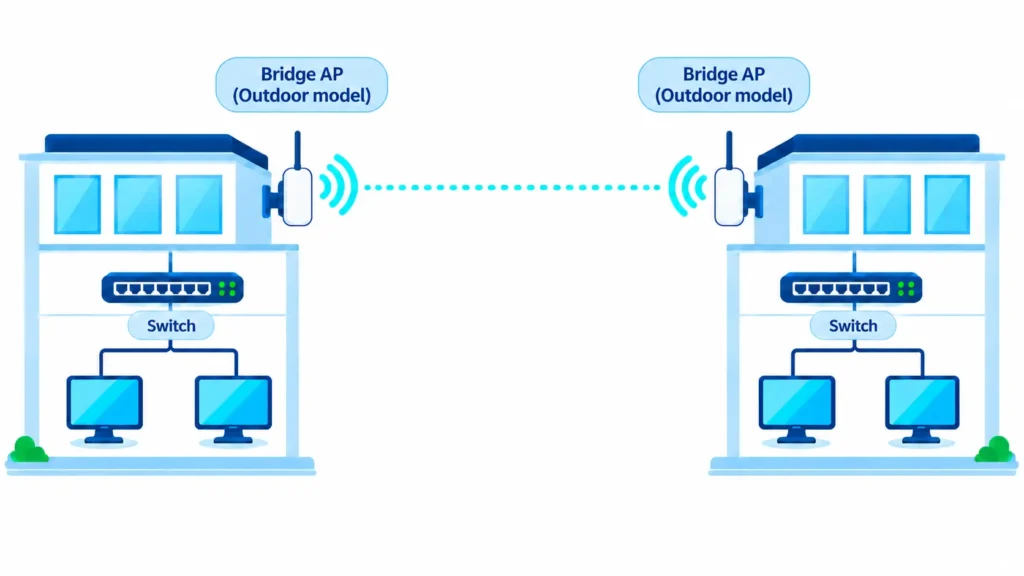
Wireless Bridge
A wireless bridge connects separate network segments through a wireless connection. It can be useful when physical cabling between two buildings or locations is difficult.
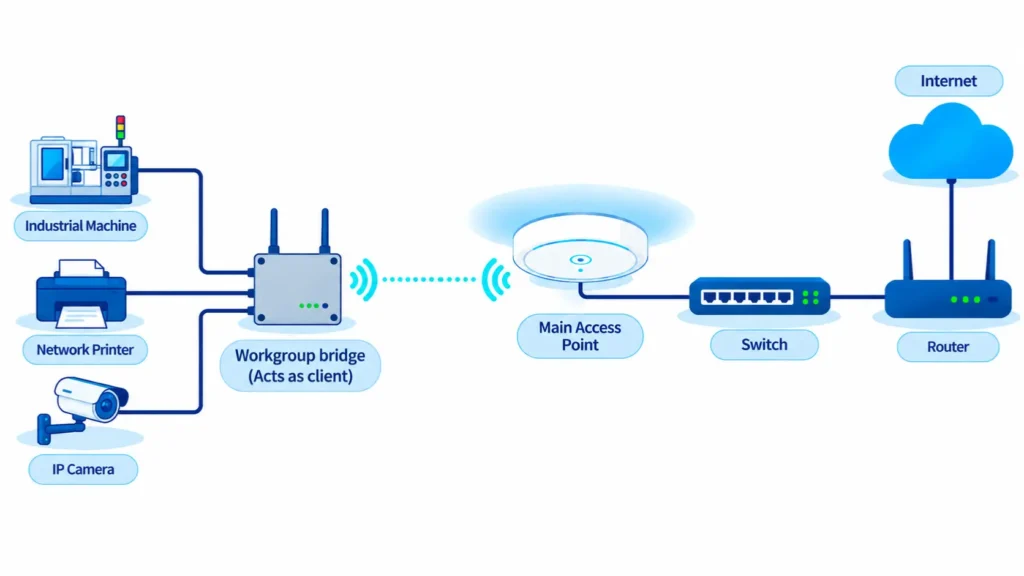
Workgroup Bridge
A workgroup bridge allows compatible wired devices to connect to a wireless network through a wireless link. It can be useful for equipment that does not have built in WiFi capabilities.
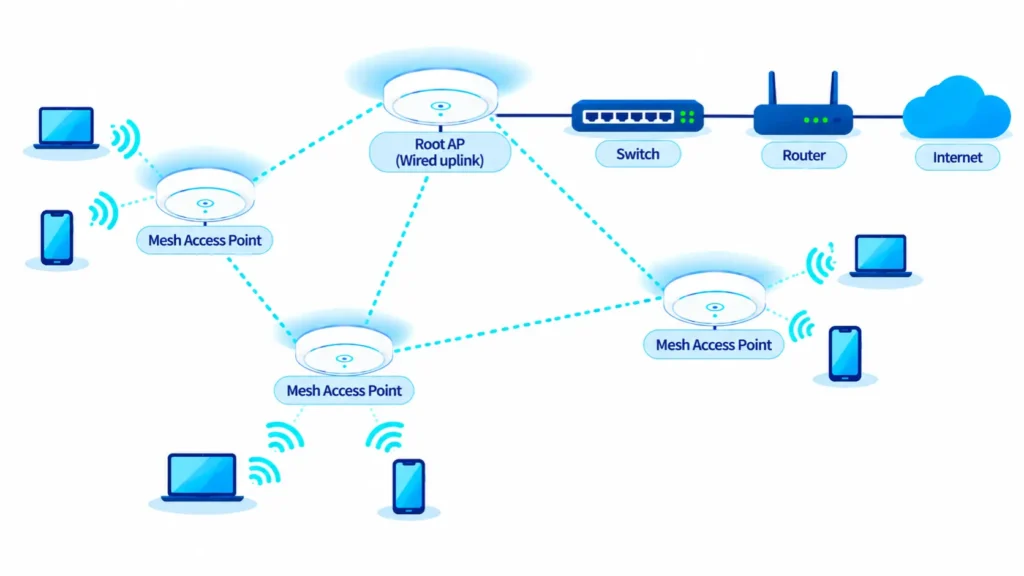
Mesh Access Point
A mesh access point communicates with other mesh nodes to extend wireless coverage. Depending on the system, it can use wireless or wired backhaul.
What Is Power over Ethernet in Access Points?
Power over Ethernet (PoE) allows compatible Ethernet cables to carry both network data and electrical power. Many business wireless access points support PoE, so they can receive power directly from a compatible network switch.
This is particularly useful when installing access points on ceilings or walls where separate electrical connections would be inconvenient. PoE capable switches such as the Cisco Catalyst 9200 and 9300 series are a common choice. See our Cisco products range for options.
The connected switch and access point must support compatible PoE standards and power requirements.
How to Choose the Right Type of Access Point
Selecting an access point depends on your organisation’s requirements. Consider these factors:
- Network size: Small networks may use standalone access points, while larger environments may benefit from centralised management.
- Installation location: Indoor, outdoor and ruggedised access points are designed for different environments.
- Coverage requirements: Building layout and user density affect access point placement.
- Management needs: Cloud managed and controller based solutions offer different management options.
- Power requirements: Check PoE support and switch compatibility.
- Future expansion: Consider expected growth in users, connected devices and network traffic.
Not sure which option fits? Our pre sales consultants can help you choose before you buy, and our Cisco support and services team can handle configuration and design.
Conclusion
Wireless access points come in different types to support a variety of network environments. From standalone and cloud managed devices to outdoor, ruggedised and mesh access points, each option serves different connectivity and management requirements.
Understanding these differences helps businesses choose equipment that suits their network size, coverage needs and installation environment.
However, choosing the right equipment is only one part of building a reliable network. Businesses must also consider performance, security, installation and long term operational needs. Explore these in our related guide on the benefits and uses of wired and wireless networking for businesses.
Frequently Asked Question
The main types are standalone, controller based, cloud managed, indoor, outdoor, ruggedised and mesh access points.
Controller based access points are managed through a wireless LAN controller, usually on premises. Cloud managed access points are managed through an online dashboard, which suits businesses with several locations.
FSI Information Technology supplies Cisco wireless products in Dubai and across the UAE, including Cisco Catalyst 9120, Aironet 2800, Meraki MR and the Cisco CW9176D1 access point.
Not always, but most business access points support PoE because it lets one cable carry both data and power.
You can buy them from FSI Information Technology, an authorised Cisco distributor in the UAE.
Related Reading
- What Is a Network Access Point? Wired vs Wireless Explained – Understand how access points work and how wired and wireless connectivity differ.
- Benefits and Uses of Wired and Wireless Networking for Businesses – Discover the advantages, applications and planning considerations of business networks.