
What Is a Network Access Point? Wired vs. Wireless Explained
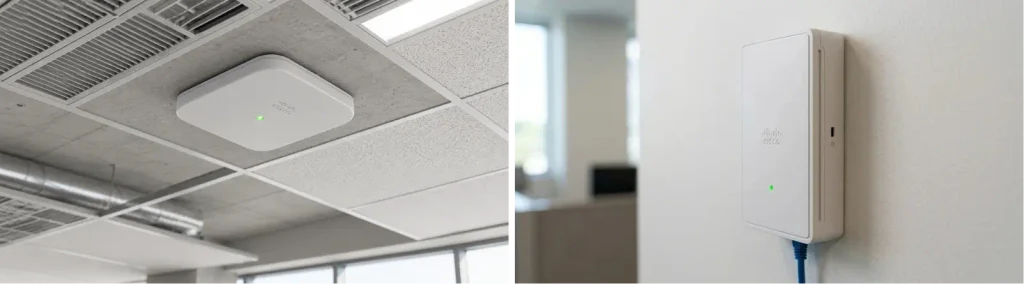
A reliable network is essential for modern businesses. From connecting employees and sharing files to running cloud applications and communication systems, organisations in Dubai and across the UAE depend on stable network infrastructure to keep their operations running smoothly.
One important part of this infrastructure is the network access point (AP). It lets wireless devices connect to a local area network (LAN), so employees, visitors and other users can reach network resources without individual Ethernet cables.
But what exactly is a network access point? How does it work, and what is the difference between wired and wireless connectivity?
In this guide, FSI Information Technology, an authorised Cisco supplier in Dubai, explains the fundamentals of network access points, how they connect to business networks and how wired and wireless technologies work together.
What Is a Network Access Point?
A network access point (AP) is a networking device that allows WiFi enabled devices to connect to a wired local area network. It acts as the bridge between wireless devices and your existing network infrastructure.
For example, when an employee connects a laptop or smartphone to office Wi-Fi, the access point receives the wireless data and forwards it through the network. It also sends network data back to the connected device.
Access points are usually installed on ceilings, walls or other suitable locations to provide wireless coverage across a building. In Dubai and the wider UAE, they are widely used in:
- Corporate offices and commercial towers
- Schools and universities
- Hospitals and healthcare facilities
- Hotels and hospitality venues
- Warehouses and industrial facilities
- Retail stores and shopping centres
How Does a Wireless Access Point Work?
A wireless access point connects to the existing network, usually through an Ethernet cable plugged into a network switch. Once installed and configured, it broadcasts a WiFi signal that compatible devices can join.
A typical connection works like this:
- The access point connects to the business network through an Ethernet cable.
- It broadcasts a configured wireless network name (SSID).
- Users connect their laptops, smartphones or other devices to the WiFi network.
- The access point forwards data between wireless devices and the wired network.
- The connected devices can access authorised network resources and internet services.
The Ethernet connection between the access point and the network is called a wired backhaul. Some wireless systems also support wireless backhaul, where access points communicate with each other without needing a direct Ethernet cable to every unit.
What Is the Difference Between an Access Point and a Router?
Access points and routers are often confused because both are involved in network connectivity. However, they perform different functions.
| Feature | Router | Wireless Access Point |
|---|---|---|
| Main purpose | Connects different networks | Connects wireless devices to a network |
| Routing | Directs traffic between networks | Normally bridges wireless clients to the LAN |
| Wi-Fi | Some routers include Wi-Fi | Provides Wi-Fi connectivity |
| DHCP and NAT | Commonly performs these functions | Usually relies on the network router |
| Common use | Internet and network gateway | Extending wireless network access |
Many home and small office devices combine router, switch and wireless access point functions in one unit. In larger business networks, these functions are usually handled by separate devices, such as enterprise Cisco routers, Cisco switches and dedicated access points.
What Is the Difference Between a Wireless Access Point and an Ethernet Switch?
An access point and an Ethernet switch are two different networking devices that commonly work together.
Wireless Access Point
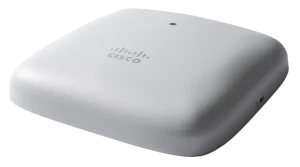
A wireless access point provides Wi-Fi connectivity for devices such as:
- Laptops
- Smartphones
- Tablets
- Wireless printers
- IoT devices
It allows these devices to connect to the network without individual Ethernet cables.
Ethernet Switch
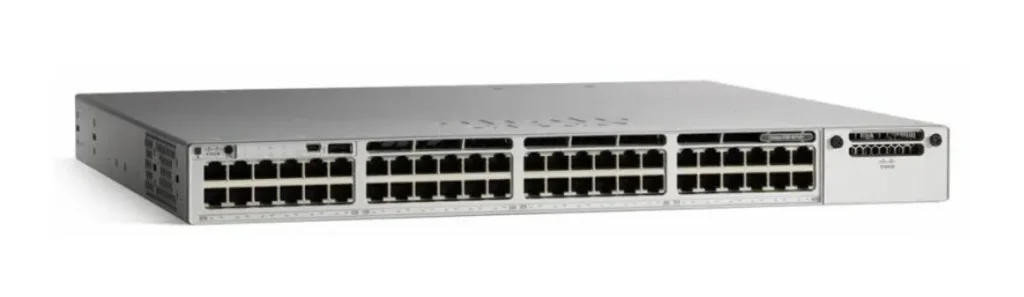
An Ethernet switch connects devices through physical network cables. Common wired devices include:
- Desktop computers
- Servers
- Network printers
- IP cameras
- VoIP phones
- Network storage systems
Managed Ethernet switches can also provide advanced features such as VLANs, Quality of Service (QoS), traffic monitoring and Power over Ethernet (PoE). For example, Cisco Catalyst switches such as the Catalyst 9200, 9300 and 9500 series are widely used in business networks to connect devices and power access points over a single cable.
Wired vs. Wireless Network Connectivity
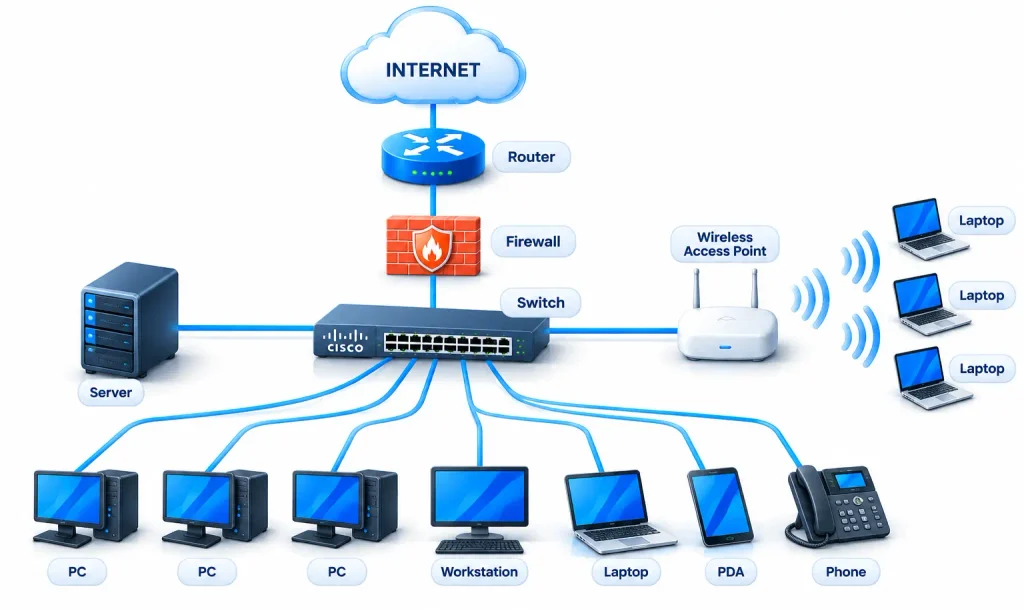
Wired and wireless networking offer different ways for devices to communicate with the network.
Wired Network Connectivity
Wired connectivity uses physical cables, such as Cat5e, Cat6, Cat6a or fibre-optic cables. Ethernet switches manage these connections and forward data between devices on the network.
Key characteristics:
- Requires physical network cabling.
- Provides stable and consistent connectivity.
- Generally offers lower latency than Wi-Fi.
- Is less affected by wireless interference.
- Supports high-bandwidth applications.
- Can provide electrical power through PoE on compatible switch ports.
Wireless Network Connectivity
Wireless connectivity uses Wi-Fi to connect devices without individual network cables. Wireless access points provide coverage and allow multiple devices to connect to the same network.
Key characteristics:
- Supports mobility and flexible device placement.
- Reduces the need for individual cables to client devices.
- Can extend coverage across multiple rooms or floors.
- May be affected by interference, walls and network congestion.
- Requires appropriate wireless security and authentication.
Wired vs. Wireless Comparison
| Feature | Wired Network | Wireless Network |
|---|---|---|
| Connection | Ethernet or fibre cable | Wi-Fi |
| Mobility | Limited by cable | Supports mobility |
| Stability | Generally consistent | Depends on signal quality |
| Latency | Usually lower | Can vary |
| Interference | Less affected by radio interference | Can experience wireless interference |
| Installation | Requires cabling | Requires access point installation |
| Common devices | PCs, servers, printers | Laptops, smartphones, tablets |
Do Wireless Access Points Need an Ethernet Cable?
Most traditional business wireless access points connect to the network using an Ethernet cable. This cable carries data between the access point and the Ethernet switch, and it can also supply power if both devices support Power over Ethernet.
Some wireless systems use mesh technology or wireless backhaul instead, where one access point talks wirelessly to another to extend coverage. The right approach depends on your building layout, cabling availability, performance needs and network design
How Many Access Points Does a Business Need?
ThThere is no fixed number that suits every business. The required number depends on:
- Building size and layout
- Number of connected users and devices
- Wall materials and physical obstructions
- Wireless interference
- Required coverage and signal strength
- Network traffic and application requirements
A small office may need only a few access points, while a university campus, hospital or large hotel may need a centrally managed wireless network with many. A wireless site survey is the best way to identify the right installation points and coverage needs.
What Types of Network Access Points Are Available?
Access points come in different designs to suit different network sizes and environments. Common types include standalone, controller based, cloud managed, indoor, outdoor, ruggedised and mesh access points.
As a Cisco reseller in Dubai, FSI Information Technology supplies a range of Cisco wireless solutions, including:
- Cisco Catalyst 9120 for WiFi 6 coverage
- Cisco Aironet 2800 for indoor access point deployments
- Cisco Meraki MR for cloud managed Wi-Fi
- Cisco Catalyst 9800 wireless controllers for centralised management
- Cisco Wireless CW9176D1 access point for high performance wireless needs
Each type has different management features, installation needs and use cases. For a closer look, read our guide on 7 Types of Wireless Access Points and Their Configurations.
Why Are Wired and Wireless Networks Used Together?
Most modern business networks combine both. For example, a company may use Ethernet switches to connect servers, desktop computers and security cameras, while wireless access points provide WiFi for employees, visitors and mobile devices.
This hybrid approach helps organisations balance connectivity, mobility, performance and network management. It also depends on proper network planning, device selection and security configuration. FSI Information Technology supports this with enterprise networking solutions in Dubai and Cisco support and services covering configuration, design and troubleshooting.
Conclusion
A network access point allows wireless devices to connect to a local network, while Ethernet switches connect devices that use physical cables. They do different jobs, but together they form the foundation of most modern business networks.
Understanding how access points work, and how wired and wireless connectivity differ, is the first step to choosing the right network infrastructure. The next step is understanding the different access point designs and where each one fits.
Frequently Asked Questions
A network access point is a device that lets Wi-Fi enabled devices connect to a wired local area network.
No. A router connects different networks and directs traffic between them, while an access point connects wireless devices to an existing network.
FSI Information Technology supplies Cisco wireless products in Dubai and across the UAE, including Cisco Catalyst 9120, Aironet 2800, Meraki MR and Catalyst 9800 wireless controllers.
You can buy genuine Cisco switches, routers and wireless products from FSI Information Technology, an authorised Cisco distributor in the UAE.
Yes. Most offices use several access points to cover the whole space and support more users.
It depends on your floor area, number of users, building materials and applications. A wireless site survey gives the most accurate answer.
Related Reading
- 7 Types of Wireless Access Points and Their Configurations – Explore access point types, management methods and wireless configurations.
- Benefits and Uses of Wired and Wireless Networking for Businesses – Learn how businesses use wired and wireless connectivity and how to choose a suitable setup.