
 Case Study
A Real WiFi Case Study: Zone-based Internet Loss in a Business Centre in Dubai
Network Troubleshooting · Business Centre · Real Incident
In one of our recent support cases at a business centre in Dubai, we encountered a WiFi issue that initially appeared random — but after deeper analysis, it revealed a surprisingly specific and fixable underlying cause. This is how our expert IT support team in Dubai cracked the case.
The Complaint
Slow internet? Or no internet at all?
Users on a specific floor reported three types of problems: slow WiFi performance, frequent disconnections, and in some cases, being connected to WiFi but getting no internet at all.
What made this unusual was its pattern. The issue was not affecting everyone equally — and that gave our expert technician an early clue.
- Only users in a specific direction or zone were impacted
- Even users sitting very close to an Access Point in that section faced the issue
- Users in other areas of the same floor had stable connectivity and normal speeds
 This directional pattern immediately ruled out general bandwidth issues or ISP-related problems. The root cause had to be something more localised. Cases like this are exactly why businesses in Dubai rely on professional IT network support services rather than attempting self-diagnosis.
Initial Observations
Standard checks — and what they revealed
The technician started with the basics before drawing any conclusions. Our engineers follow a structured approach — the same methodology that drives our IT AMC (Annual Maintenance Contract) services in Dubai, where proactive troubleshooting prevents small issues from becoming floor-wide outages.
- Verified internet link stability — no issues found
- Checked AP health status — most devices appeared normal
- Confirmed signal strength — strong signals even in affected areas
 Strong signal but no internet in one zone pointed away from hardware failure and toward a configuration or topology-level problem. That shifted the focus to the Unified Controller.
Root Cause Analysis
What the Unified Controller revealed
Using the Unified Controller — the central management system overseeing all access points — the technician confirmed his suspicion.
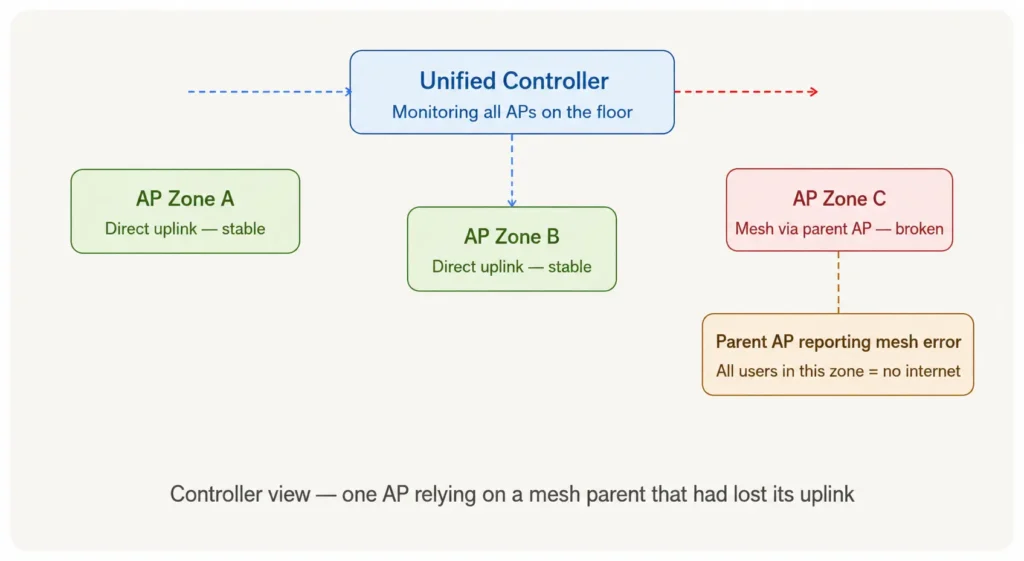
Here is exactly what was happening:
- All APs had mesh mode enabled across the floor
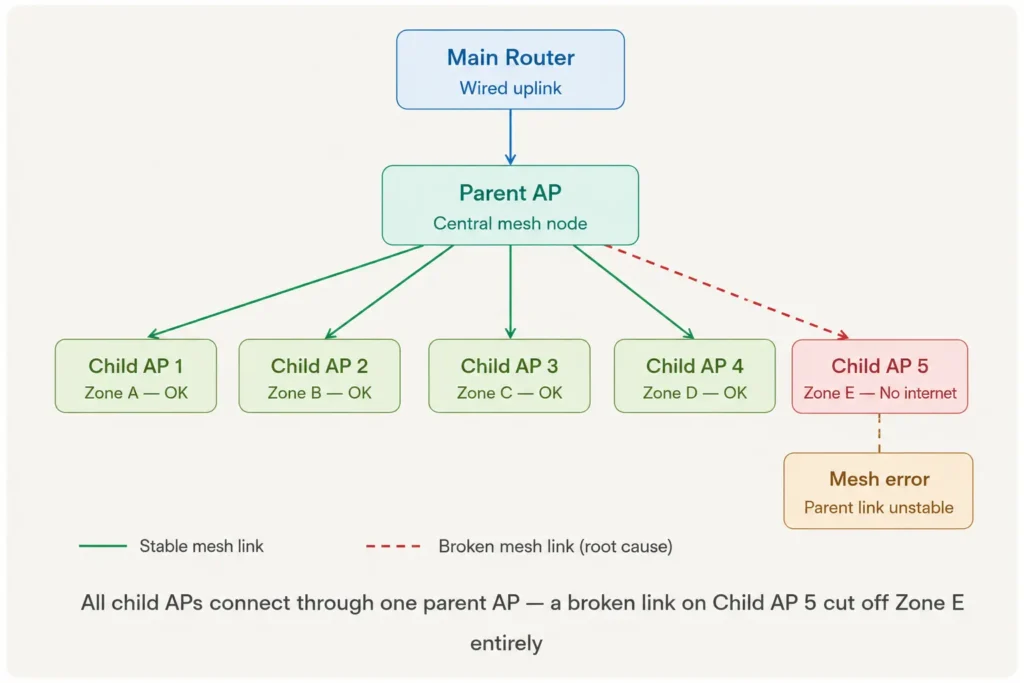
- One AP was receiving its uplink through another AP (its “parent”) instead of a direct wired connection
- That child AP had an unstable connection to its parent, breaking the internet path for everyone connected to it
The Fix
Step by step: how it was resolved
Logged into the Unified Controller — accessed the central dashboard to get a full view of all AP statuses and configurations across the floor.
Identified the faulty AP — spotted the access point showing a mesh error, confirming it had lost stable communication with its parent AP.
Confirmed the affected zone — cross referenced the directional complaint with the AP’s coverage area. It matched exactly.
Disabled mesh mode on all APs via the Unified Controller — ensuring every AP now uses a direct wired uplink instead of a wireless mesh link.
 Think of it like a relay race — if one runner drops the baton, the whole chain stops. The AP was physically on and broadcasting, but it could not pass internet traffic because its parent had an issue. The WiFi signal was there; the route to the internet was not.
Before & After
Network state comparison
| Before the Fix |
|---|
| All APs running on mesh mode |
| Child APs dependent on one parent AP |
| Zone E users: no internet access |
| Directional complaints from one floor section |
| Fault invisible without controller access |
| After the Fix |
|---|
| All APs using direct wired uplinks |
| Each AP independent — no dependencies |
| All zones: full internet restored |
| No zone-based issues reported |
| Network fully visible and stable |
Key Takeaways
What this case teaches us




Related Services
How we can help your business
This case is one example of the day-to-day network challenges our team resolves across business centres, offices, and enterprise environments in Dubai. Whether it is a WiFi misconfiguration, a telephony issue, or a full network overhaul, our group of companies covers every layer of your IT infrastructure.
| Service | What we offer |
|---|---|
| fsi.ae | Cisco networking, WiFi solutions, routers, switches, and security appliances in Dubai |
| fsiae.com | IT AMC services — proactive maintenance and 24/7 IT support contracts for businesses in Dubai |
| itserve.ae | IT support services, network infrastructure, and managed IT for business centres and offices |
| callcentre.ae | Contact centre solutions and customer communication technology for businesses in the UAE |
| foursquareint.com | Four Square International — end-to-end IT support and technology solutions across Dubai |
| ipoffice500.com | IP Office telephony systems — business phone solutions and unified communications |
| dialer.ae | Dialer solutions for call centres and outbound communication in the UAE |
Facing a similar Wi-Fi or network issue at your office or business centre? Our certified engineers are available 24/7 to diagnose and resolve network problems fast.
Final thought: Even a small configuration setting like mesh mode can significantly impact user experience across an entire zone. Proper network design, combined with controller-based monitoring, is what allows hidden issues like this to be identified and resolved quickly — before they disrupt an entire business floor.
If your business relies on stable WiFi and network connectivity, talk to our team at FSI Technology. With over 20 years of Cisco expertise in the UAE, we design, deploy, and maintain networks that simply work.
FAQ
Frequently Asked Questions
Common questions about WiFi issues, Cisco access points, and mesh networking in business environments.
Being connected to a WiFi network does not always mean you have a working route to the internet. In this case, the access point was broadcasting a signal normally, but its uplink to the internet was broken because of a faulty mesh connection to its parent AP. The device joins the WiFi, but the path to the internet stops at the misconfigured access point. This is a common issue in environments where Cisco mesh networking is enabled without proper planning.
Directional or zone-based WiFi issues are usually caused by a specific access point failing rather than a general network problem. In this case, mesh mode caused one AP to depend on another for its internet connection. When that dependency broke, only users connected to that specific AP lost internet — while everyone else on the floor was unaffected. Professional IT network support with controller-level access is the fastest way to identify which AP is causing the issue.
Mesh mode allows access points to connect wirelessly to each other and share a single internet source, forming a “mesh” network. It is useful in environments where running physical cables to every AP is not possible. However, in offices and business centres that already have structured cabling, enabling mesh creates unnecessary wireless dependencies between APs. If one AP in the chain loses its connection, all APs that depend on it also lose internet. The safest approach in a wired environment is to disable mesh and give every AP its own direct wired uplink. Our team at FSI Technology recommends this for all commercial deployments.
The best starting point is the Unified Controller, which gives you a full overview of every AP’s status, uplink health, and mesh relationships. Key steps include: checking the AP’s uplink type (wired vs wireless mesh), looking for parent AP errors, confirming signal strength is not the issue, and reviewing the AP’s event log for connectivity drops. In this case, the controller immediately showed a mesh error on one AP, pointing directly to the root cause. If you need help with Cisco WiFi troubleshooting in Dubai, our certified engineers are available 24/7.
A Unified Controller is a centralised management platform that monitors and controls all access points across a network from a single dashboard. It shows each AP’s connection status, uplink type, signal health, client connections, and any active errors. Without it, diagnosing issues like mesh dependency failures would require physically checking every device. With it, the root cause was identified in minutes. This is one of the key advantages of deploying Cisco networking solutions in Dubai — enterprise-grade visibility that makes troubleshooting fast and accurate.
An IT AMC (Annual Maintenance Contract) includes scheduled network health checks, proactive monitoring, and rapid response to faults — meaning issues like misconfigured mesh settings are caught before they affect users. In this case, the mesh mode had likely been enabled by default and gone unnoticed. Under an active AMC, our engineers would have flagged this during a routine audit. If you are looking for reliable IT AMC services in Dubai, our team provides 24/7 support with Cisco-certified engineers.
In a mesh network, the parent AP is the one with a direct wired connection to the internet. Child APs connect wirelessly through the parent to get their internet access. This means all child APs are fully dependent on the parent’s connection being stable. In this incident, all access points on the floor were child APs connected through a single parent AP. When one child AP developed an unstable link to the parent, users in that AP’s zone lost internet entirely. This is why our network infrastructure team always recommends direct wired uplinks for every AP in commercial environments.
Yes — in environments where phone systems rely on the same network infrastructure, a WiFi or network misconfiguration can directly impact voice calls, VoIP services, and contact centre operations. Stable network connectivity is the foundation of any reliable telephony setup. Our group of companies covers both network infrastructure through FSI Technology and communication systems through callcentre.ae, ipoffice500.com, and dialer.ae — ensuring your entire communications stack stays connected and stable.